
Wrike logo.
    • For teams
      • Marketing

        Streamline proofing and reporting for seamless campaigns.

      • Creative & Design

        Create high-quality assets and get them approved in record time.

      • Product

        Accelerate your product process, from idea to delivery.

      • Client Services

        Exceed clients’ expectations with expert resources.

      • PMO

        Align strategy with execution and deliver results.

      • IT

        Execute initiatives, optimize workflows, and automate requests.

      • Operations

        Make work flow seamlessly with intuitive management tools.

      • HR

        Manage teams effortlessly with customizable HR features.

      • Legal

        Organize every file, case, and due date in one secure space.

      • Finance

        Centralize all financial tasks, from budgeting to invoicing.

      • See all teams

    • Workflows
      • Campaign Management

        Make marketing magic with end-to-end campaign management.

      • Agency Management

        Take full control of your agency management processes.

      • Client Service Delivery

        Get ahead of the competition with faster client services.

      • Product Lifecycle

        Watch your product lifecycle flow, from concept to customer.

      • Project Portfolio Management

        Manage your complete portfolio, from strategy to results.

      • Creative Production & Content

        Create, collaborate, proof, and approve all in one place.

      • Workflow Management

        Use custom statuses and automate your team workflows.

      • Project Management

        Plan Agile projects, track deadlines, and deliver results.

      • See all workflows

    • For industries
      • Technology

        Build solutions that matter, and deliver faster.

      • Manufacturing

        Enhance operations, accelerate production, and empower teams.

      • Professional Services

        Organize clients, streamline projects, and automate workflows.

      • Finance

        Deliver better, faster financials with automations.

      • Healthcare

        Collaborate cross-functionally in a secure setting.

      • Education

        Unite multiple disparate teams, departments, and colleges.

      • Construction

        Streamline building projects, from scoping to invoicing.

      • Media & Entertainment

        Choose one powerful platform for fast-paced work.

      • See all industries

    • Explore Wrike
      • Take a Product Tour

      • Book a Demo

      • ROI Calculator

      • Customer Stories

      • Start with Templates

    • Features
      • Dashboards

        Fuel better, faster, data-driven decisions with powerful analytics.

      • AI

        Learn about powerful AI and automations with Work Intelligence®.

      • Wrike Whiteboard

        Turn inspiration into execution with powerful visualization tools.

      • Gantt Charts

        Interactive project scheduling across teams.

      • Automation

        Define and trigger automated workflows to eliminate manual efforts.

      • Proofing

        Streamlined proofing and collaboration in one place.

      • Project Resource Planning

        Plan and allocate resources for timely delivery.

      • Project Views

        Get the full picture with customizable, intuitive project views.

      • Kanban Boards

        Instantly view project progress and create customized workflows.

      • Dynamic Request Forms

        Custom forms powered by conditional logic.

      • Approvals

        Keep approvers in the loop from start to finish.

      • Custom Item Types

        Tailor work items to fit your specific workplace.

      • See all features

    • Platform
      • Book a Demo

      • Start with Templates

      • Wrike AI

      • Integrations

      • Security

      • Mobile & Desktop Apps

    • Workflow-Powered Collaboration

      Sync with multiple teams to keep work flowing across your organization.

    • Industry-Leading Security

      We're dedicated to safeguarding data beyond industry standards and ensuring secure collaboration.

    • Pioneering AI and Innovation

      Put the power of data and AI to work for your organization.

    • Invested in Customer Success

      We support customers at every step of their journey from pre-sales to onboarding with 24/7 support.

    • Boundless Configuration

      Customize your workspace to suit the unique needs of every team in your organization.

    • Effortless Scalability

      Add new teams or adjust to rapid growth seamlessly with Wrike’s scalable platform.

    Need an extra team member?
    Build your own agent with Wrike and save 10 hours per week per project.
    Try AI agents
    • Go deeper
      • Resource Hub

        Top assets on productivity, collaboration, and more.

      • Wrike Blog

        Latest news and best practices on project management.

      • Educational Guides

        Guides and tools to unlock better work management.

      • Webinars

        Join our live or on-demand sessions to do your best work.

      • Customer Stories

        Explore Wrike’s case studies for key insights on customer success.

      • Developers

        Connect and build integrations with easy-to-use APIs.

    • Upskill and Connect
      • Training & Certifications

      • Help Center

      • Wrike's Community

      • Premium Support Packages

      • Wrike Professional Services

      • What's new

    Catch up on our most exciting product updates in 2025!
    2025 was another landmark year for Wrike, with some of our most exciting releases yet.
    Watch the video
  • Enterprise
  • Pricing
Contact Sales
  • Language selector dropdown with globe icon and list of available languages.
    English
    Dansk
    Deutsch
    Español
    Français
    Bahasa Indonesia
    Italiano
    Bahasa Melayu
    Nederlands
    Norsk
    Polski
    Português (BR)
    Svenska
    Русский
    日本語
    한국어
    中文 (简体)
    中文 (繁體)
Log in
Wrike logo.
Wrike logo.
  • Guide overview
    • Gantt Chart Basics
      • How to read a Gantt chart step by step
      • 1. Read the task list (vertical axis) first
      • 2. Orient yourself on the timeline (horizontal axis)
      • 3. Understand what the bars represent
      • 4. Check the fill or progress indicator
      • 5. Follow the arrows or lines between bars
      • 6. Look for diamonds on the timeline
      • 7. Find the critical path if it’s marked
      • 8. Check for a baseline
      • 9. Use the legend
      • Example: Reading a simple Gantt chart
      • Common mistakes to avoid
      • Put what you’ve learned to work
    • Project Management Basics
      • What are the project management basics?
      • What is a project?
      • What is project management?
      • What are the stages of project management?
      • Why is project management important?
      • What do project managers do?
      • Project manager certifications
      • Streamline your projects with Wrike
    • Project Management Charts
      • How to choose the right project management chart
      • The “pick in 30 seconds” checklist
      • 1. Gantt chart
      • 2. Kanban board
      • 3. Work breakdown structure
      • 4. PERT chart
      • 5. Critical path method (CPM)
      • 6. Milestone chart
      • 7. Burndown and burnup charts (for Agile teams)
      • 8. RACI chart
      • Common mistakes when using project management charts
      • Final thoughts
    • Project Management Methodologies
      • The top project management methodologies
      • A. The traditional, sequential methodologies
      • B. The Agile family
      • C. The change management methodologies
      • D. The process-based methodologies
      • E. Other methodologies
      • F. The PMBOK “method”
      • Empower your project management methodology with Wrike
    • Project Lifecycle
      • Key takeaways
      • What is the project lifecycle? 
      • The 5 phases of a project lifecycle
      • 1. The initiation phase
      • 2. The planning phase
      • 3. The execution phase
      • 4. The controlling and monitoring phase
      • 5. Project closure phase
      • Types of project life cycles
      • Predictive lifecycle
      • Iterative lifecycle
      • Incremental lifecycle
      • Agile lifecycle
      • Hybrid lifecycle
      • Who is involved across the project lifecycle?
      • Project manager
      • Project sponsor
      • Team members
      • Stakeholders
      • Functional managers or department leads
      • Why is project lifecycle management important?
      • Best practices in project lifecycle management
      • Start with clear goals and scope
      • Assign clear roles and decision ownership
      • Build a realistic project plan
      • Track progress continuously
      • Standardize workflows where possible
      • Document learnings at closure
      • Use one source of truth
      • Take full control of your project lifecycle with Wrike
    • Best Project Management Software
      • Here’s a list of the project management software we review fully in this guide:
      • The best 15 project management software platforms in 2026
      • 1. Wrike: Best task management software for cross-functional collaboration
      • 2. Asana: Best task management software for attractive visuals
      • 3. Monday.com: Best task management software for use case templates
      • 4. Adobe Workfront: Best task management software for Adobe integration
      • 5. Smartsheet: Best task management software for spreadsheet-style functionality
      • 6. ClickUp: Best task management software for mind mapping
      • 7. Airtable: Best task management software for data-centric teams
      • 8. Jira: Best task management software for development teams
      • 9. Trello: Best task management software for simple projects
      • 10. Notion: Best task management software for document storage
      • 11. Hive: Best task management software for user-led feedback
      • 12. Zoho Projects: Best task management software for the real estate industry
      • 13. Teamwork: Best task management software for teams looking to get started quickly
      • 14. Basecamp: Best task management software for small businesses and teams
      • 15. GanttPro: Best task management software for specialist Gantt charts
      • 10 additional PM software options
      • 1. MeisterTask
      • 2. Microsoft Project 
      • 3. ProWorkflow
      • 4. TeamGantt
      • 5. Accelo
      • 6. ProjectManager
      • 7. Planview AdaptiveWork
      • 8. Scoro
      • 9. Confluence
      • 10. LiquidPlanner
      • Choose Wrike for customizable and truly scalable project management software
      • FAQs
    • Team Collaboration Tips
      • Effective project collaboration tips for teams
      • The importance of collaboration in project management
      • How to set up a project team
      • What makes a successful project team
      • How to make the project kickoff meeting a success
      • Tips for effective team management
      • How to create a collaborative work environment
      • Project management collaboration tips and techniques
      • Tips for remote collaboration and virtual meetings
    • Agile Basics
    • Agile Project Management Tools
      • What are Agile project management tools?
      • How we evaluate and choose the top tools
      • The best Agile project management tools comparison chart
      • What are the 11 best Agile project management tools?
      • 1. Wrike
      • 2. Asana
      • 3. Monday.com
      • 4. ClickUp
      • 5. Smartsheet
      • 6. Adobe Workfront
      • 7. Jira [Atlassian] Work Management 
      • 8. Microsoft Project
      • 9. Teamwork
      • 10. Zoho Sprints
      • 11. ProofHub
      • How to pick the best Agile project management tool
      • Features to look for in Agile project management tools
      • Benefits of using Agile project management tools
      • Collaboration-boosting effects of Agile project management
      • How can an Agile project management tool help your company?
      • FAQs
      • Is Agile a project management tool?
      • How do Agile project management tools support software development teams?
      • Can Agile project management tools be customized for different project needs?
      • What are Agile methodologies, and how do they benefit Agile teams?
      • How do Agile tools improve collaboration in teams?
    • Project Management Frameworks
      • A. What is a project management framework?
      • B. What do Agile frameworks have in common?
      • C. The Scrum framework
      • D. Other popular Agile project management methods
      • Is Lean project management an Agile framework?
      • E. Agile epics defined
      • F. Project manager best practices for choosing the right framework
      • G. Free Agile project management tools
    • Resources
      • Project management training
      • Project management books
      • Leadership inspiration
    • Glossary
    • FAQ
      • Advanced Terminology
      • Agile Project Management
      • Basic Terminology
      • Methodologies
      • PM Software Features
      • PMI
      • Professional Development
      • Tools
    1. Home
    2. Project Management Guide

    Project lifecycle: The 5 phases explained

    10 min readLAST UPDATED ON APR 1, 2026
    Artem Gurnov
    Artem Gurnov Director of Account Development, Wrike

    Projects are easier to manage when teams follow a clear path from kickoff to completion. The project lifecycle gives that structure by helping teams organize work, align stakeholders, manage timelines, and keep delivery on track from start to finish.

    Key takeaways

    • The project management lifecycle is made up of five key phases: initiation, planning, execution, controlling and monitoring, and closure.
    • Understanding the project management lifecycle phases makes it easier to create a unified, comprehensive roadmap that provides structure for tracking and executing on a project.
    • Wrike provides a centralized hub to help simplify planning, track progress, improve monitoring, and uncover learnings for future projects.

    What is the project lifecycle? 

    The project lifecycle is a five-phase framework that guides a project from initial idea through final completion. It gives teams a clear structure for planning work, aligning stakeholders, tracking progress, and closing out deliverables.

    The five phases of the project lifecycle are:

    • Initiation phase
    • Planning phase
    • Execution phase
    • Controlling and monitoring phase
    • Project closure phase

    This framework helps teams organize work, clarify accountability, and keep projects aligned with scope, timelines, and costs.

    This video introduces the project lifecycle and shows how structured workflows help teams plan, execute, track, and close work more effectively.

    The 5 phases of a project lifecycle

    Every project is different, but most follow the same five core phases. Understanding what happens in each stage makes it easier to plan work, manage risks, and keep teams aligned. 

    The chart below shows the primary objective, typical outputs, and Wrike support associated with each phase.

    Phase

    Primary objective

    Typical outputs

    Wrike resources

    1. Initiation 

    Prove the project’s value and secure approval

    • Business case

    • Project charter

    • Stakeholder list

    • Custom request forms

    • Blueprints

    • AI summaries

    2. Planning

    Translate vision into an actionable roadmap

    • Project plan

    • Work breakdown structure (WBS)

    • Risk register

    • Resource plan

    • Interactive Gantt charts

    • Workload charts

    • Custom item types

    3. Execution

    Produce deliverables that meet requirements

    • Deliverable packages

    • Status reports

    • Recorded time

    • No-code automations

    • Time tracking

    • Proofing and approvals

    4. Monitoring and controlling

    Keep scope, cost, and schedule on track

    • KPI dashboards

    • Variance reports

    • Change logs

    • Real-time dashboards

    • AI alerts

    • Report templates

    5. Closure

    Wrap up formally and capture knowledge

    • Acceptance docs

    • Retrospectives

    • Archives

    • Retrospective dashboards

    • Archive workspace

    1. The initiation phase

    The initiation phase is the first phase of the entire project management lifecycle. The goal of this phase is to define the project, develop a business case for it, and get it approved. During this time, the project manager may do any of the following:

    • Perform a feasibility study
    • Create a project charter
    • Identify key stakeholders
    • Select project management tools

    By the end of this phase, the project manager should have a high-level understanding of the project’s purpose, goals, requirements, and risks.

    Wrike in action: The initiation phase

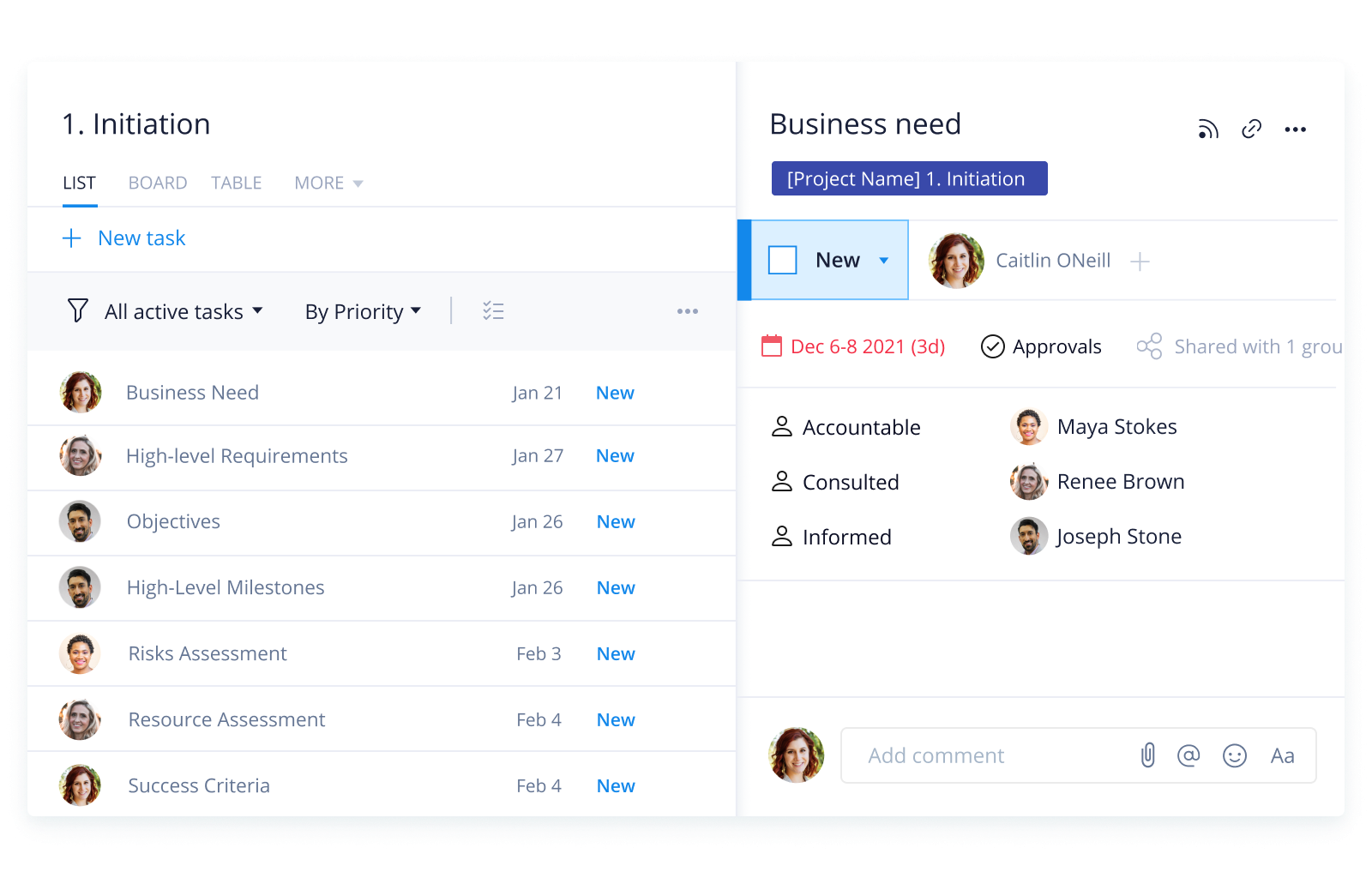
    • Request forms and intake workflows: Capture information like project charters, budgets, and statements of work (SOWs) within a single submission, and automatically create structured projects or tasks directly in the platform.

    • Blueprints: Create standardized workstreams for tasks like stakeholder analysis or feasibility checklists.

    • Work Intelligence® AI summaries: Turn dense project briefs into clear, concise objectives and identify early-stage risks to flag to relevant stakeholders.
    plaintext-templates_raci-template_en_0plaintext-templates_raci-template_en_0

    Wrike helps teams organize project intake, define early requirements, and clarify stakeholder roles before work begins.

    2. The planning phase

    The planning phase is critical to creating a project roadmap that the entire team can follow. This is where all of the details and goals are outlined in order to meet the requirements laid out by the organization.

    During this phase, project managers will typically:

    • Create a project plan
    • Develop a resource plan
    • Define goals and performance measures
    • Communicate roles and responsibilities to team members
    • Build out workflows
    • Anticipate risks and create contingency plans

    Wrike in action: The planning phase

    • Interactive Gantt charts: Map timelines, identify discrepancies, and set milestones with live Gantt charts that auto-shift dates as plans change.

    • Workload and resource planning: Overview team capacity and flag bandwidth concerns early on.

    • Custom item types: Create unique custom item types to reflect what your project will need, from work breakdown structure (WBS) elements to risk registers — all using labels that suit you and your team.

    Wrike’s Gantt chart helps teams map dependencies, schedule work, and adjust timelines as project plans evolve.

    3. The execution phase

    This stage is where the bulk of the project happens. Deliverables are built to make sure the project is meeting requirements. This is when most of the time, money, and people are pulled into the project.

    As previously mentioned, a kickoff meeting usually marks the official start of the execution phase. A kickoff meeting agenda might look something like this:

    • Introductions: Who’s who?
    • Project background: Why are you doing this project? What are the goals?
    • Project scope: What kind of work is involved?
    • Project plan: What does the roadmap look like?
    • Roles: Who will be responsible for which elements of the project?
    • Communication: What kind of communication channels will be used? What kind of meetings or status reports should your team expect?
    • Tools: Which tools will be used to complete the project, and how will they be used?
    • Next steps: What are the immediate action items that need to be completed?
    • Q&A: Open the floor for any questions.

    Wrike in action: The execution phase

    • No-code automations: Route tasks, update statuses, and notify owners when things change, cutting down on follow-up time.

    • Built-in time tracking: Capture billable and non-billable hours at task level, and send data directly into reports that help you optimize resources and keep the team focused on high-priority tasks.

    • Online proofing and approvals: Compare versions side by side, invite external collaborators, and centralize feedback to help secure a fast sign-off.

    4. The controlling and monitoring phase

    The controlling and monitoring phase happens in tandem with the execution phase. As the project moves forward, the project manager must make sure all moving parts are seamlessly headed in the right direction. If adjustments to the project plan are needed due to unforeseen circumstances or a change in direction, they can be made here.

    During the controlling and monitoring phase, project managers may perform any of the following tasks:

    • Manage resources
    • Monitor project performance
    • Manage risk
    • Perform status meetings and reports
    • Update project schedule
    • Modify project plans

    At the end of this phase, all the agreed project deliverables should be completed and accepted by the customer.

    Wrike in action: The controlling and monitoring phase

    • Real-time dashboards: Stay on target with next-gen dashboards that surface KPIs, blockers, and overdue items in one place to help course-correct.

    • Project reporting: Assess progress, cut down on potential risks, and make data-driven decisions with complete project visibility.

    • Real-time alerts: With AI-powered alerts, catch potential roadblocks like schedule risks or cost overruns early before they become bigger issues.

    5. Project closure phase

    The closing phase is a critical step in the project management lifecycle. It signals the official end of the project and provides a period for reflection, wrap-up, and organization of materials.

    Project managers can:

    • Take inventory of all deliverables
    • Tie up any loose ends
    • Hand the project off to the client or the team that will be managing the project’s day-to-day operations
    • Perform a post-mortem to discuss and document any learnings from the project
    • Organize all project documents in a centralized location
    • Communicate the success of the project to stakeholders and executives
    • Celebrate project completion and acknowledge team members

    Wrike in action: The project closure phase

    • Retrospective dashboards: Pull performance data into a high-level overview to draw insights for future project planning.

    • Archives: Completed work can be securely stored for easy access in the future, with full searchability. 

    Types of project life cycles

    Not every project follows the exact same delivery model, even if the core phases stay the same. The right project lifecycle depends on how much is known at the start, how often requirements may change, and how much flexibility the team needs during delivery.

    Common project lifecycle types include:

    • Predictive lifecycle
    • Iterative lifecycle
    • Incremental lifecycle 
    • Agile lifecycle
    • Hybrid lifecycle

    Predictive lifecycle

    A predictive lifecycle works best when scope, timelines, and deliverables are clearly defined early on. Work is planned in advance and completed in a structured sequence, making this model common in construction, manufacturing, and other projects with limited room for change.

    Iterative lifecycle

    An iterative lifecycle allows teams to refine the project over time. Work is repeated in cycles, with each version improving on the last. This approach is useful when requirements are expected to evolve as the team learns more.

    Incremental lifecycle

    In an incremental lifecycle, the project is delivered in smaller, usable pieces instead of all at once. This helps teams create value earlier and gather feedback as work progresses.

    Agile lifecycle

    An Agile lifecycle combines iterative and incremental delivery. Teams work in short cycles, adapt quickly to changing priorities, and continuously improve based on stakeholder or customer feedback. This model is widely used in software, product, and marketing teams.

    Hybrid lifecycle

    A hybrid lifecycle blends structured planning with flexible delivery. For example, a team may define budget, milestones, and governance upfront, then execute the work in Agile sprints. This is often the best fit for cross-functional organizations, balancing control with adaptability.

    Who is involved across the project lifecycle?

    Different roles contribute in different ways across the project lifecycle. While the level of involvement shifts by phase, successful delivery depends on clear ownership from start to finish.

    Common project lifecycle roles include: 

    • Project manager 
    • Project sponsor
    • Team members
    • Stakeholders
    • Functional managers or department leads 

    Project manager

    The project manager coordinates the work across all five phases. They define timelines, align stakeholders, manage risks, track progress, and help keep the project on scope and on schedule.

    Project sponsor

    The project sponsor provides strategic direction, secures funding or approval, and helps remove major blockers. Their role is especially important during initiation, key approvals, and major decision points.

    Team members

    Team members do the work needed to produce project deliverables. They are often most involved during planning, execution, and monitoring, where clarity around responsibilities and deadlines matters most.

    Stakeholders

    Stakeholders may include executives, department leads, clients, or end users. They help shape requirements, review progress, provide feedback, and approve outcomes throughout the lifecycle.

    Functional managers or department leads

    In cross-functional projects, department leaders help allocate resources, approve priorities, and ensure work aligns with broader team goals.

    As projects move from one phase to the next, each role shifts from planning and approval to execution, oversight, feedback, and final signoff. The more clearly these responsibilities are defined, the easier it is to maintain momentum.

    Why is project lifecycle management important?

    Project lifecycle management gives teams a repeatable structure for moving work from idea to completion. Instead of reacting to problems as they appear, teams can plan work more clearly, assign responsibilities earlier, and monitor progress at every stage.

    A defined lifecycle also improves visibility. Stakeholders can see what phase a project is in, what outputs are expected, and where risks or delays may be developing. This makes decision-making easier and reduces confusion across teams.

    Strong project lifecycle management also helps organizations:

    • Improve planning accuracy
    • Control scope and costs
    • Reduce missed deadlines
    • Strengthen communication and accountability
    • Create consistent processes across projects
    • Capture lessons that improve future work

    Without a clear lifecycle, projects are more likely to stall, drift out of scope, or suffer from unclear handoffs. A structured approach makes it easier to keep teams aligned and deliver better outcomes.

    Best practices in project lifecycle management

    Managing the project lifecycle effectively requires more than just moving through the phases in order. Teams need clear processes, visibility, and consistent communication from start to finish.

    • Start with clear goals and scope 
    • Assign clear roles and decision ownership 
    • Build a realistic project plan 
    • Track progress continuously
    • Standardize workflows where possible 
    • Document learnings at closure
    • Use one source of truth

    Start with clear goals and scope

    Set expectations early by defining what success looks like, what the project includes, and what it does not. This helps reduce confusion and prevents scope creep later.

    Assign clear roles and decision ownership

    Projects move faster when everyone knows who is responsible for execution, review, approval, and escalation. Clear ownership reduces delays and makes handoffs smoother.

    Build a realistic project plan

    Create timelines, milestones, dependencies, and resource plans that reflect the team’s actual capacity. Overly aggressive plans often create avoidable risks later in execution.

    Track progress continuously

    Monitoring should not be saved for the end. Use dashboards, reports, and regular check-ins to spot issues early and adjust before they affect delivery.

    Standardize workflows where possible

    Templates, request forms, approval paths, and repeatable project structures help teams save time and create more predictable outcomes.

    Document learnings at closure

    Retrospectives and post-project reviews help teams identify what worked, what slowed progress, and what should change next time.

    Use one source of truth

    Keeping tasks, timelines, feedback, and reporting in one place reduces confusion and helps teams stay aligned across the full lifecycle.

    Take full control of your project lifecycle with Wrike

    Understanding the project lifecycle is essential for successful project management. By following the best practices and strategies outlined in this guide, project managers can approach each project stage with confidence, ensure on-time and on-budget delivery, and exceed stakeholder expectations.

    Now that you understand each stage in the project management lifecycle, choosing the right project management tool for you and your team is critical to project success. You can streamline the project lifecycle with Wrike — use it to automate tasks, track progress, and facilitate collaboration. With an intuitive interface and powerful features, Wrike can help you stay organized and focused, resulting in a well-managed project lifecycle. 

    Reach out to our team to learn more about how Wrike can support you along every phase of the project management lifecycle, or get started today with a free two-week trial.

    Project lifecycle FAQs

    The planning phase is considered the most critical phase of the project management lifecycle. Clear planning helps align key stakeholders on timeline, budget, and resources to help prevent costly rework.

    Each phase of the project management lifecycle helps cut risk:

    • Initiation: Verify goals and feasibility
    • Planning: Map scope, budget, and potential risks
    • Execution: Ensures ongoing alignment with the plan
    • Monitoring and controlling: Proactively catch variances and delays
    • Closing: Learn lessons to avoid the same mistakes

    No, a project lifecycle refers to the stages a project goes through, while process groups are collections of activities or tasks that can repeat within each phase.

    Effective project lifecycle management depends on clear goals, defined roles, realistic planning, continuous tracking, and consistent workflows. With Wrike, teams can keep tasks, timelines, feedback, and reporting in one place, making it easier to stay aligned, improve visibility, and move work forward from initiation through closure.

    Project lifecycle management tools help teams plan work, assign responsibilities, track timelines, monitor performance, and document outcomes in one place. Wrike supports this with features like request forms, Gantt charts, dashboards, automations, reporting, and approvals.

    Further Reading:

    infographic
    What Is Resource Management and Why Is It Important?
    blog post
    How to Improve the Change Management Process for 7 Key Personality Types
    blog post
    Stop Projects From Derailing With Wrike’s New Report Templates
    ebook
    Resource Management Guide
    Basic Project Management
    • Project Charter
    • Project Management Stakeholders
    • What is a Project?
    • Work Breakdown Structure
    • Project Objectives
    • Project Baseline
    • Project Management Scheduling
    • Project Management Work Packages
    • Project Management Scope
    • Scope Creep
    Advanced Project Management
    • What is PERT?
    • S-Curve
    • Network Diagram
    • SMART
    • Risk Management
    • Cost Estimation
    • Feasibility Study
    • Monte Carlo Analysis
    • Project Integration
    • Cost Management
    PMI
    • Milestones
    • PDU
    • PMI Project Management
    • What To Do With Certification
    • Certification
    • Become Certified
    • PMP Certification
    • Best Certification
    Software Features
    • Critical Success Factors
    • Capacity Planning
    • User Role Access Permissions
    • Time Tracking
    • Budget Tracking
    • Request Forms
    • Work Assignments
    • Version Control
    • Dependency Managements
    • Project management Milestones
    Tools
    • Project Management Software
    • Project Management Tools
    • Project Management System
    • Gantt Charts
    • Product
      • Product tour
      • Pricing
      • Wrike AI
      • Templates
      • Apps & Integrations
      • Task Management
      • Gantt Charts
      • Security
      • Wrike API
      • Compare
      • Features
    • Solutions
      • Enterprise
      • Marketing
      • Creative
      • Project Management
      • Product Development
      • Business Operations
      • Professional Services
      • IT Management
      • Students
      • All Teams
      • All Use Cases
    • Resources
      • Help Center
      • Community
      • Blog
      • Webinars
      • Interactive Training
      • Support Packages
      • Wrike Status
      • Find a Reseller
      • Google Project Management Tools
      • CA Notice at Collection
    • Company
      • About Us
      • Leadership
      • Careers
      • Our Customers
      • Events
      • Newsroom
      • Partner Program
      • Collaborate - User Conference
      • Wrike Engineering
      • Contact Us
    • Guides
      • Project Management Guide
      • Professional Services Guide
      • Workflow Guide
      • Kanban Guide
      • Agile Guide
      • Scrum Guide
      • Marketing Project Management Guide
      • Collaborative Work Management Guide
      • Digital Marketing Guide
      • Go-to-Market Guide
      • Remote Work Guide
      • Return to Work Guide
      • Product Management Guide
      • Goal Setting Guide

    Subscribe to Wrike news and updates

    Stay informed with the latest news and updates by subscribing to our marketing emails.
    Logo AICPALogo BSILogo CSA STAR

    Enterprise-Grade Security.
    Uptime Over 99.9%

    ©2006-2026 Wrike, Inc. All rights reserved. Patented. Privacy Policy. Terms of Service. Your Privacy Choices

    Wrike logo